
Flipkart Plus membership is designed to reward you every time you shop. Whether you are a current member or interested in joining, understanding how the program works can help you get more value from your purchases. Here is everything you need to know about Flipkart Plus membership, from exclusive sale access to SuperCoins to a Netflix Mobile plan.
What is Flipkart Plus?
Flipkart Plus is Flipkart’s earned loyalty program that offers additional benefits on every purchase. As a member, you can earn SuperCoins on eligible purchases and redeem them to save more on future orders, gain early access to select sale events, receive exclusive bank offers, and unlock subscription of a Netflix Mobile plan.
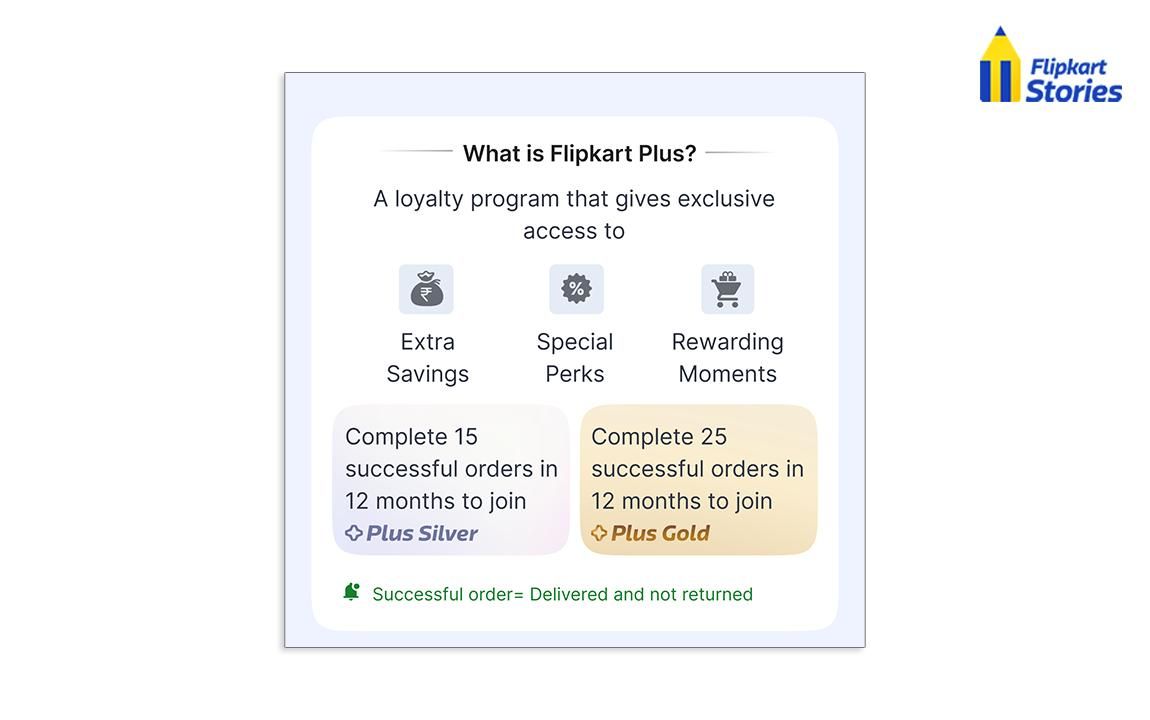
The program has two membership levels, Flipkart Plus Silver and Flipkart Plus Gold. Your membership level depends on the number of successful transactions you have done on Flipkart in the last 365 days. As you progress through the tiers, you earn SuperCoins at a faster rate and get better benefits.
Flipkart Plus Silver vs Gold
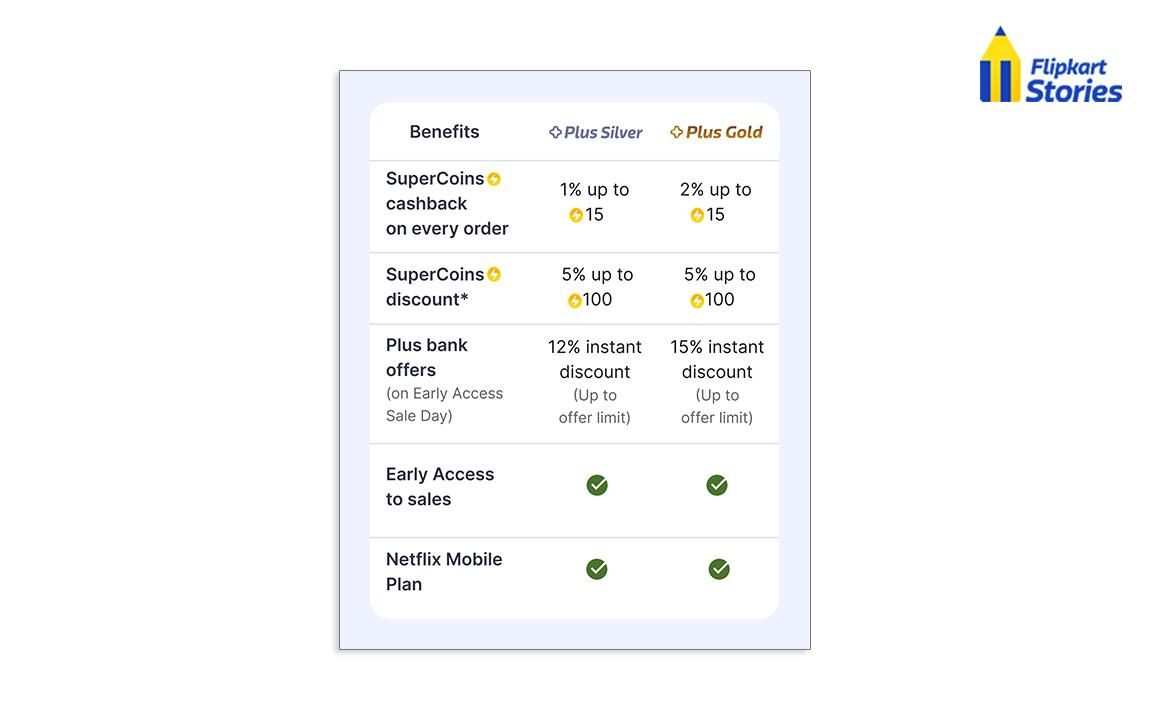
Flipkart Plus offers two membership tiers, each designed to reward active shoppers. Depending on your membership tier, you can unlock different rewards. Here's how the two compare:

Once you join Flipkart Plus Silver and complete 25 successful transactions in 365 days, your membership will be automatically upgraded to Flipkart Plus Gold. No extra enrollment process is necessary.
Netflix Mobile Plan Benefit
As a Flipkart Plus member you will now be able to unlock Netflix Mobile Plan every month by completing four orders of ₹299 or more, across Flipkart, Minutes and Grocery. Once unlocked, the benefit can be claimed directly through the Flipkart app.
Upon fulfilling these prerequisites, you can activate your Netflix Mobile plan from the Plus page in your Flipkart account.
The benefit can be re-initiated each month by completing the qualifying orders again. To find out more, read here.
How to Become a Flipkart Plus Member
You can become a Flipkart Plus member by completing the required number of successful transactions on Flipkart over the last 365 days.
- Flipkart Plus Silver: Complete 15 successful transactions in the last 365 days.
- Flipkart Plus Gold: Complete 25 successful transactions in the last 365 days.
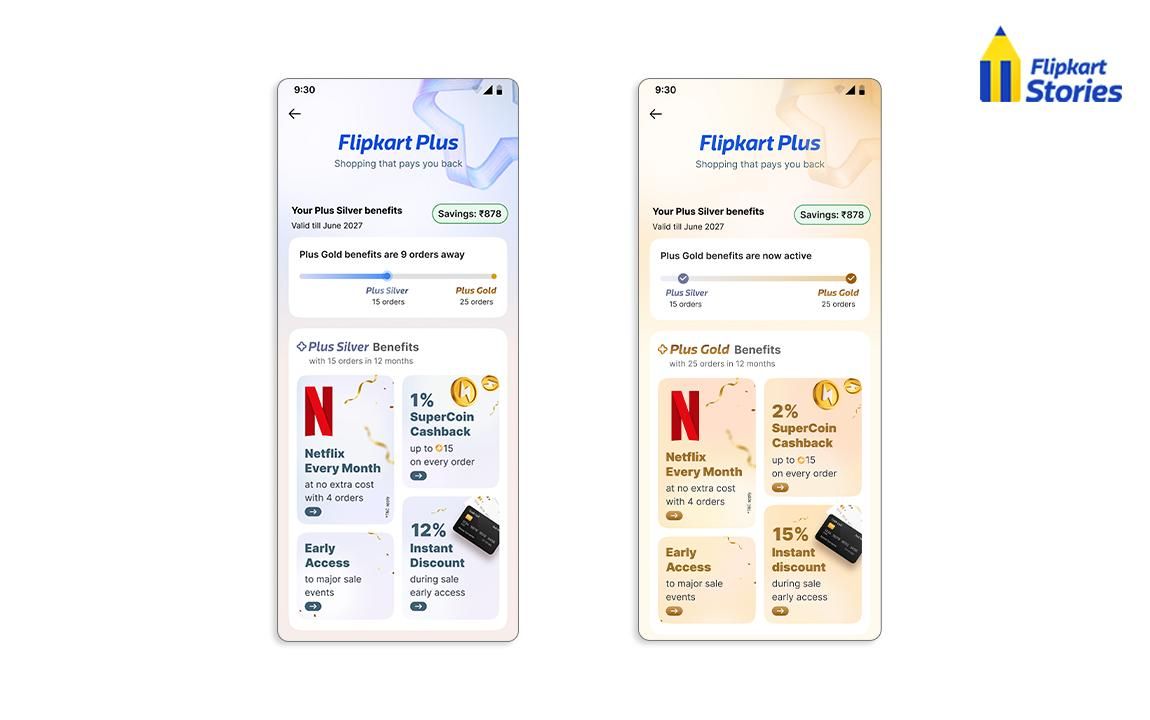
If you meet the eligibility requirements, your membership will activate automatically. If you are a Flipkart Plus Silver member and you successfully complete 25 transactions in 365 days, you are upgraded to Flipkart Plus Gold
Please note that membership eligibility for Flipkart Plus is not based on purchases in select categories. These include:
- Gift cards
- Precious metal coins and bars
- Select gift vouchers
- Digital products
- Recharges and bill payments
- Tobacco products
- Fresh milk
- Baby diapers
- Certain seller packaging materials
How to Earn and Redeem SuperCoins
By being a Flipkart Plus member, you get to earn SuperCoins on your orders, which you can redeem to get discounts on your future orders.
How to Earn SuperCoins
The higher your membership level, the more SuperCoins you can get.
- Flipkart Plus Silver: Earn 1 SuperCoin for every ₹100 spent on eligible purchases
- Flipkart Plus Gold: Earn 2 SuperCoins for every ₹100 spent on eligible purchase
Earn up to 50 SuperCoins per calendar month across all eligible orders, with a maximum of 15 SuperCoins per order. You will be credited with SuperCoins on your account once the return period for your order has ended.
How to Redeem SuperCoins
You can use your SuperCoins to get select eligible products on Flipkart.
- Redeem up to 5% SuperCoins (maximum 100 SuperCoins per unit) on eligible products across Flipkart, excluding Flipkart Minutes
- Redeem up to 2% SuperCoins (maximum 100 SuperCoins per transaction) on Flipkart Minutes
The number of SuperCoins you can redeem will depend on the product and the terms and conditions that apply at the time of purchase.
How to Check Your Flipkart Plus Status and SuperCoins
You can check your Flipkart Plus membership tier and SuperCoins balance anytime through the Flipkart app or website
On the Flipkart App
1. Log in to your Flipkart account
2. Go to the Plus or SuperCoin section from your account
3. View your membership tier, available SuperCoins, and SuperCoin activity
On the Flipkart website
1. Log in to your Flipkart account
2. Click My Account
3. Open the SuperCoin Zone to view your SuperCoins and membership details
If you've recently completed the required number of successful transactions, your membership tier is updated automatically once you're eligible
Frequently Asked Questions
How do Flipkart Plus Silver and Flipkart Plus Gold differ?
Flipkart Plus Silver is available after 15 successful transactions in the last 365 days, and Flipkart Plus Gold requires 25 successful transactions. Gold members can get a bigger instant discount on Hero Bank on qualifying sale events and earn SuperCoins at an accelerated rate.
Will my Flipkart Plus Silver automatically upgrade to Gold?
Yes. If you’ve successfully completed 25 transactions within the last 365 days, your Flipkart Plus Silver membership will be automatically upgraded to Flipkart Plus Gold. No separate application is needed.
What is the maximum amount of SuperCoins you can earn in a month?
You can get up to 50 SuperCoins for placing all eligible orders in a calendar month. SuperCoins are credited after the return period for the respective order expires.
When will I receive my SuperCoins?
Your account will be credited with SuperCoins only after the return period of your eligible order has expired.
How do I check the status of my Flipkart Plus membership?
You can check your membership tier and SuperCoins balance in the Plus or SuperCoin section of the Flipkart app. Alternatively, you can do so by visiting the SuperCoin Zone on the Flipkart website.


